
A Scratch coding program is often one of the best first steps for children who are new to coding. Instead of typing complex commands, children use colourful drag-and-drop blocks to create games, animations, stories, quizzes, and simple interactive projects.
For many kids in Singapore, this makes coding feel less intimidating. They can focus on ideas, logic, and creativity without being stopped by spelling mistakes or missing symbols. With the right guidance, Scratch becomes more than screen time. It becomes a structured way to build problem-solving skills, patience, and confidence.
Meta Robotics supports children through age-based robotics and coding programmes that help young learners move from guided STEM play to Scratch-based coding, robotics projects, and more advanced technology skills.
What Is a Scratch Coding Program?
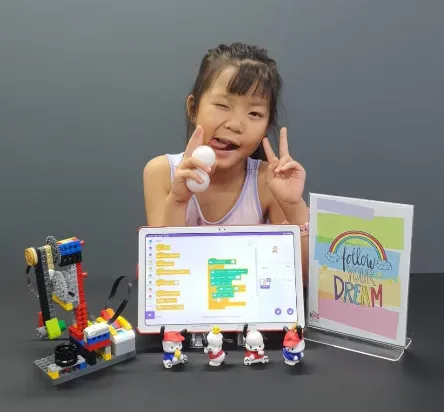
A Scratch coding program teaches children how to create digital projects using visual programming blocks. Each block represents an action, such as moving a character, playing a sound, changing a background, or checking whether two objects touch.
Children learn by building projects such as:
-
Animated stories
-
Simple platform games
-
Quiz games
-
Character conversations
-
Digital greeting cards
-
Maths or spelling challenges
-
Robot-style movement simulations
Because Scratch shows results immediately, children can test their work quickly. If something does not happen as expected, they can adjust the blocks and try again. This helps them understand that mistakes are part of learning.
Why Scratch Is a Good First Step for Kids
Scratch works well for beginners because it removes the pressure of typed code. Many children are not ready to memorise commands, brackets, punctuation, or spelling rules. Scratch lets them learn the thinking behind coding first.
It Builds Logical Thinking
Children learn that computers follow instructions in order. If the blocks are arranged wrongly, the project behaves differently. This teaches sequencing, cause and effect, and step-by-step planning.
It Encourages Creativity
Scratch is not only about coding. Children choose characters, design scenes, add music, create rules, and build their own stories. This keeps lessons engaging and helps children feel ownership of their work.
It Teaches Problem-Solving
When a game does not work, children must find out why. They learn to check one part at a time, test changes, and improve their project. This habit is useful in schoolwork and daily life.
It Builds Confidence
A child who creates a working game or animation can see proof of their progress. That confidence often motivates them to try harder challenges later.
What Skills Do Children Learn in Scratch?
A good Scratch coding program should introduce coding ideas in a clear order. Children should not only copy blocks from the teacher. They should understand what each block does.
Key skills include:
Sequences
Children learn to arrange actions in the correct order. For example, a character may move, speak, jump, then change costume.
Loops
Loops allow actions to repeat. This is useful in games, animations, and movement patterns.
Conditions
Conditions help a project make decisions. For example, “if the player touches the enemy, lose one life.”
Variables
Variables store information such as score, time, speed, or lives. This helps children understand how games remember and update data.
Events
Events tell the project when to start an action, such as clicking a flag, pressing a key, or touching another object.
Debugging
Debugging means finding and fixing errors. Children learn to stay calm, test carefully, and improve their work.
What Age Should Kids Start Scratch Coding?
Many children are ready for Scratch-style learning around ages 7 to 9, especially if they can read simple instructions and use a mouse or tablet comfortably.
Younger children may benefit from simpler robotics and guided STEM play first. Meta Robotics offers age-based pathways where younger learners begin with hands-on building and early logic activities before progressing into coding, robotics, games, and animation.
A general guide is:
-
Ages 5 to 6: early robotics, simple logic, guided activities
-
Ages 7 to 9: Scratch, animation, games, and robotics foundations
-
Ages 10 to 12: more complex projects, robotics challenges, and portfolio work
-
Ages 13 and above: advanced coding, design thinking, and technology projects
The right starting point depends on the child’s focus, confidence, and interest level.
How to Choose a Scratch Coding Program in Singapore
Parents should look for a class that is structured, hands-on, and age-appropriate. A strong programme should help children build real projects, not just follow random worksheets.
Before enrolling, ask:
-
Is the class suitable for my child’s age?
-
Will my child create finished projects?
-
Are lessons hands-on and guided?
-
How does the teacher help when a child gets stuck?
-
Is there a clear path after Scratch?
-
Will parents see progress through projects or updates?
Meta Robotics uses progressive robotics and coding pathways to help children build skills over time, from early STEM exploration to Scratch-based projects, robotics challenges, and competition preparation.
FAQ
What is Scratch coding for kids?
Scratch coding is a beginner-friendly way for children to learn programming using visual blocks. Kids create games, animations, stories, and interactive projects without typing complex code.
What age is best for Scratch coding?
Many children are ready for Scratch around ages 7 to 9. Younger children can start with guided robotics, building activities, and simple logic games before moving into Scratch.
Does Scratch help children learn real coding later?
Yes. Scratch teaches important coding ideas such as sequences, loops, conditions, variables, events, and debugging. These ideas prepare children for more advanced coding later.
Does Meta Robotics teach Scratch coding?
Yes. Meta Robotics includes coding, games, animation, and robotics in its age-based learning pathways, helping children build confidence through hands-on projects.
